Introduction
Email domain reputation security is a core part of modern email protection. If a domain is not properly authenticated, legitimate messages may land in spam, fail delivery, or be treated as suspicious by mailbox providers. At the same time, weak email controls make it easier for attackers to spoof the domain in phishing, impersonation, and fraud campaigns.
Mailbox providers evaluate far more than message content. They assess sender trust continuously using DNS authentication records, sender behavior, complaint rates, bounce patterns, blacklist history, and transport security. That means email reputation is not just a mail operations issue. It is a security control area that directly affects brand trust, business communication, and exposure to abuse.
This guide explains how email reputation works, what technical controls affect it, and how to configure the core records used to improve both deliverability and anti-spoofing protection.
Why This Matters for Security Leaders
Email remains one of the most heavily abused channels in the enterprise. It is used for executive communication, customer notifications, invoices, support workflows, vendor coordination, and security alerts. When domain protections are weak, that trust can be exploited.
Poor email reputation creates several practical risks:
Legitimate messages may not reach the inbox
If mailbox providers do not trust the sending domain or infrastructure, business emails may be filtered, quarantined, or rejected.
Attackers can spoof the domain
Without strong sender authentication and enforcement, attackers can send messages that appear to come from the organization.
Brand trust can erode
Customers and partners often judge legitimacy by what arrives in their inbox. If messages are missing, flagged, or abused in phishing campaigns, trust declines quickly.
Security teams lose visibility
Without reporting and policy controls, it becomes difficult to identify who is sending on behalf of the domain, what is misconfigured, and where abuse is happening.
Understanding the Core Concept
Email reputation is often compared to a credit score for a domain or sending infrastructure. Mailbox providers and secure email gateways use multiple trust signals to decide whether to deliver, filter, or block messages.
What impacts email reputation?
Several factors shape sender reputation over time:
- Spam complaints: If recipients mark messages as spam, trust drops.
- Bounce rates: Sending to invalid or stale addresses makes the sender look careless or abusive.
- Sending volume and consistency: Sudden spikes or unusual sending patterns can trigger filtering.
- Blacklists: If the domain or sending IPs appear on blocklists, deliverability usually declines.
- Authentication and security controls: SPF, DKIM, DMARC, STARTTLS, and BIMI all contribute to overall trust posture
These signals work together. Strong technical controls cannot fully compensate for poor sender behavior, and clean sending behavior does not remove the need for authentication.
The Three Core Email Authentication Records
The foundation of email domain protection is built on three protocols: SPF, DKIM, and DMARC. Each one addresses a different part of the trust problem, and all three should be used together.
SPF – Sender Policy Framework
SPF defines which mail servers are allowed to send email for a domain. When a receiving system gets a message claiming to come from that domain, it checks the SPF TXT record in DNS and compares the actual sending host against the authorized list.
If the sender is not authorized, the message may be marked suspicious or rejected depending on downstream policy.
How SPF works
SPF is effectively a DNS-based allowlist. It can authorize:
- the hosts in the domain’s MX records
- the hosts in the domain’s A records
- specific IP addresses or subnets
- third-party senders through include: statements
This matters because many organizations send mail through more than one platform. Common examples include Microsoft 365, Google Workspace, marketing platforms, ticketing systems, CRM tools, and transactional email services.
Important SPF record settings
The most important SPF endings are:
- -all = hard fail, reject unauthorized senders
- ~all = soft fail, mark unauthorized senders as suspicious
- +all = allow anyone to send on behalf of the domain
The +all option should never be used in a secure production environment because it removes the protection SPF is meant to provide.
SPF example
v=spf1 mx a ip4:X.X.X.X/32 ip4:X.X.X.X/28 a:ns1.example.com include:emailsender.com ~all
Breakdown:
- v=spf1
Declares SPF version 1. - mx
Allows the systems listed in the domain’s MX records to send mail. - a
Allows the IP addresses returned by the domain’s A records. - ip4:X.X.X.X/32
Allows one specific IPv4 address. - ip4:X.X.X.X/28
Allows a subnet range of IPv4 addresses. - a:ns1.example.com
Authorizes the host ns1.example.com based on its A record. - include:emailsender.com
Imports authorization from another domain, typically used for third-party email services. - ~all
Applies a soft fail to anything not explicitly authorized
SPF implementation considerations
SPF is important, but it has practical limitations:
- It checks the envelope sender, which may differ from the visible From address.
- Mail forwarding can break SPF because the forwarding server may not be listed in the original record.
- SPF has DNS lookup limits, so too many include: mechanisms can cause failures.
- If sender inventory is incomplete, legitimate business systems may fail authorization.
SPF works best when it is maintained as part of a controlled sender inventory process.

DKIM – DomainKeys Identified Mail
DKIM adds a cryptographic signature to outgoing email. The sending server signs selected headers, and sometimes parts of the message body, using a private key. The receiving system retrieves the matching public key from DNS and verifies the signature.
If the signature validates, the message is more trustworthy because it shows that the sender was authorized to use the signing domain and that the signed parts of the message were not altered in transit.
Why DKIM matters
Unlike SPF, DKIM is not tied directly to the sending IP address. That makes it more resilient in modern cloud email environments where messages may pass through relays or forwarding systems.
It also supports message integrity. If the signed content changes after the message is sent, the signature will fail validation.
DKIM record settings
Common DKIM components include:
- s= selector, which identifies the key
- p= public key used for validation
- h= signed headers used in validation
In DNS, DKIM records are typically published under a selector such as:
selector1._domainkey.example.com
And the TXT record value might look like:
v=DKIM1; k=rsa; p=MIGfMA0GCSqGSIb3DQEBAQUAA4GNADCBiQKBgQ…
A fuller example:
v=DKIM1; k=rsa; p=MIGfMA0GCSqGSIb3DQEBAQUAA4GNADCBiQKBgQCGP5J7wJ7I0Ke9Zqyy1g+JaBXI1/sL8xmtdFxUJe3R/VTYS/PnglVsh2ac/S/U|dT9WpbPegPHGYEJ45K475sn0dUrDIDFxR16/eCNC8XOYgnqqXmnibrRftsE+XDIJzeku4/ZaClgaMNOS+ocMQm2YqucvbNaeW5Lx7GdYzkqxwIDAQAB
Breakdown:
- v=DKIM1
Declares DKIM version 1. - k=rsa
Specifies the key algorithm as RSA. - p=
Contains the public key used by recipients to validate the signature
DKIM implementation considerations
- Use sufficiently strong keys.
- Rotate keys periodically.
- Use separate selectors for different sending services where practical.
- Make sure third-party platforms sign using an aligned domain when needed for DMARC.
- Monitor signature failures because they often point to relay changes, platform misconfiguration, or message rewriting in transit.
DKIM is especially useful in environments where multiple services send mail on behalf of the same organization.

DMARC – Domain-based Message Authentication, Reporting and Conformance
DMARC builds on SPF and DKIM. It allows a domain owner to publish a policy telling receiving systems how to handle messages that fail authentication and alignment checks. It also adds reporting, which gives visibility into both legitimate and unauthorized senders.
If a message fails SPF or DKIM and does not align properly with the visible domain, the receiver can apply the DMARC policy.
Important DMARC record settings
Key DMARC tags include:
- p= defines the policy and can be set to none, quarantine, or reject
- rua= defines where aggregate reports should be sent
- ruf= defines where forensic or failure reports should be sent
- fo= controls failure reporting options
- adkim= sets DKIM alignment mode to strict or relaxed
- aspf= sets SPF alignment mode to strict or relaxed
- pct= sets the percentage of mail subject to the policy
- sp= defines the policy for subdomains
DMARC example
v=DMARC1; p=quarantine; rua=mailto:[email protected]; ruf=mailto:[email protected]; fo=1; adkim=s; aspf=r; pct=100; sp=reject
Breakdown:
- v=DMARC1
Declares DMARC version 1. - p=quarantine
Requests that failing mail be treated as suspicious, often by routing it to spam or quarantine. - rua=mailto:[email protected]
Sends aggregate DMARC reports to this address. - ruf=mailto:[email protected]
Sends forensic failure reports where supported. - fo=1
Requests failure reporting if either SPF or DKIM fails. - adkim=s
Uses strict DKIM alignment. - aspf=r
Uses relaxed SPF alignment. - pct=100
Applies the policy to 100 percent of messages. - sp=reject
Requests a reject policy for subdomains
DMARC failure reporting options
The fo= tag can be set to:
- 0 → generate reports if both SPF and DKIM fail
- 1 → generate reports if either SPF or DKIM fails
- d → report on DKIM failure regardless of alignment
- s → report on SPF failure regardless of alignment
DMARC rollout approach
DMARC should be implemented in phases rather than enforced aggressively on day one.
Phase 1: Visibility
v=DMARC1; p=none; rua=mailto:[email protected]
This provides reporting without enforcement and helps identify all legitimate senders.
Phase 2: Controlled enforcement
v=DMARC1; p=quarantine; pct=25; rua=mailto:[email protected]
This applies policy gradually and helps surface remaining misconfigurations.
Phase 3: Full enforcement
v=DMARC1; p=reject; pct=100; rua=mailto:[email protected]; sp=reject
This provides the strongest protection against direct-domain spoofing.
A phased approach is important because deploying a strict policy too early can break legitimate business email flows, especially when undocumented SaaS platforms or third-party systems are involved.
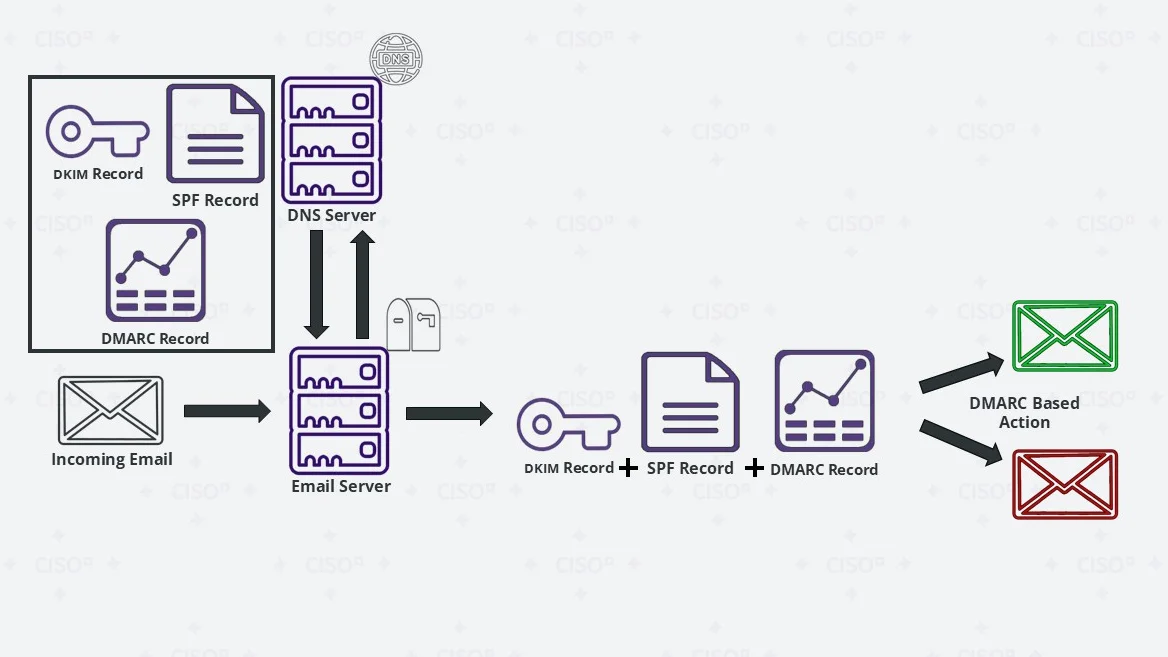
How SPF, DKIM, and DMARC Work Together
No single email authentication method is enough on its own. SPF, DKIM, and DMARC each address different weaknesses.
- SPF verifies whether the sending host is authorized.
- DKIM verifies whether the message was signed and remains intact.
- DMARC checks whether SPF and/or DKIM align with the visible sending domain and defines how failures should be handled.
Together, they provide layered protection against spoofing, unauthorized sending, and trust failures.
This layered model matters because:
- SPF alone can fail when mail is forwarded.
- DKIM alone does not provide policy enforcement.
- DMARC depends on SPF and DKIM working properly to be effective.
When all three are configured correctly, mailbox providers gain a much stronger basis for trusting legitimate messages.
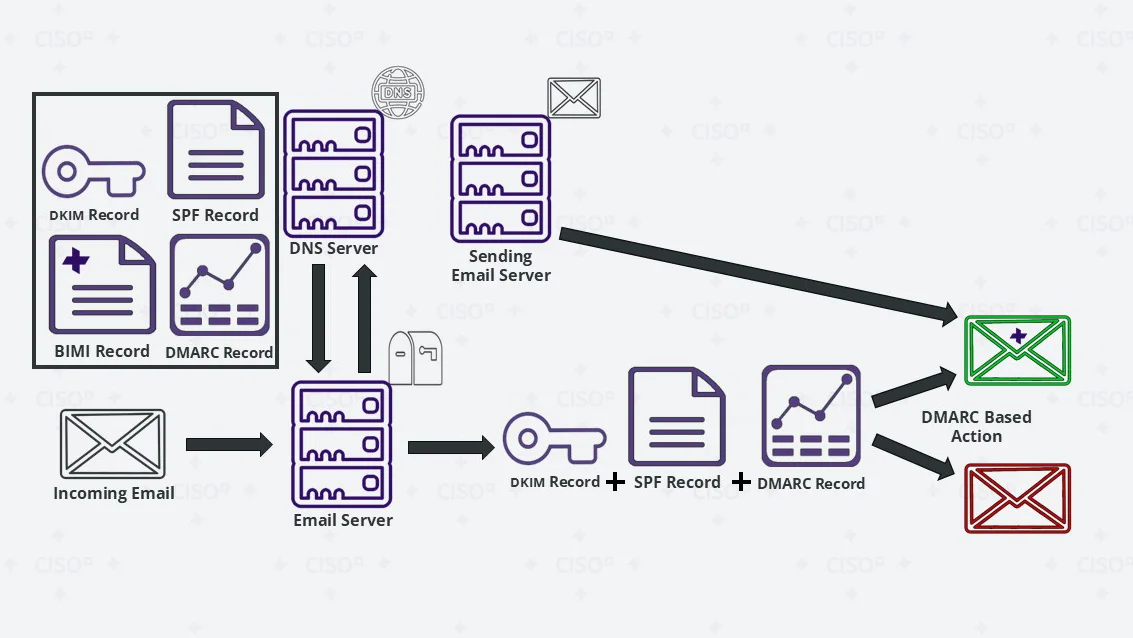
BIMI – Brand Indicators for Message Identification
BIMI is a DNS-based standard that helps supported inbox providers display a verified logo next to authenticated email. It works alongside DMARC and can improve brand recognition and user trust.
BIMI does not replace sender authentication. It depends on sender authentication maturity.
BIMI record settings
A BIMI record is typically published under:
- default._bimi.[yourdomain]
Common BIMI parameters include:
- l= the location of the SVG logo
- a= the location of the Verified Mark Certificate (VMC)
BIMI example
default._bimi.example.com IN TXT “v=BIMI1; l=https://example.com/logo.svg; a=https://example.com/vmc.pem;”
Breakdown:
- v=BIMI1
Declares BIMI version 1. - l=https://example.com/logo.svg
Points to the organization’s approved SVG logo. - a=https://example.com/vmc.pem
Points to the Verified Mark Certificate where required
BIMI implementation considerations
BIMI should be treated as a trust enhancement rather than a foundational control. It is most effective after:
- SPF is stable
- DKIM is aligned
- DMARC enforcement is in place
- brand assets and VMC requirements are prepared
For organizations with strong customer-facing email use, BIMI can reinforce visual trust in supported inboxes.
STARTTLS – Encrypting Email in Transit
STARTTLS upgrades a plaintext SMTP connection to an encrypted TLS connection between mail servers. If both sending and receiving systems support it, the message is encrypted while in transit.
This helps reduce the risk of passive interception and exposure of sensitive information as messages move across the internet.
What STARTTLS does
- Encrypts server-to-server email traffic in transit
- Improves confidentiality during transmission
- Reduces exposure to interception on untrusted networks
What STARTTLS does not do
- It does not authenticate the visible sender identity
- It does not prevent spoofing
- It does not replace SPF, DKIM, or DMARC
- It does not guarantee end-to-end encryption for message content
This distinction matters. STARTTLS protects transport confidentiality, while SPF, DKIM, and DMARC protect authenticity and trust.

Common Email Security Threats and How to Prevent Them
Email reputation problems often become visible through abuse scenarios. Several common threats can be reduced significantly through proper authentication and monitoring.
Spoofing – Attackers forge the domain to send fake emails
Spoofing attacks make malicious emails look like they come from a trusted sender. These messages may contain phishing links, malware, or fraudulent requests.
Potential solution:
Implement SPF, DKIM, and DMARC, and progress toward a p=reject DMARC policy. Monitor DMARC reports for unauthorized senders. BIMI can help reinforce legitimacy for supported inboxes once the domain has a mature authentication posture
Backscattering – Attackers trigger large volumes of non-delivery reports
Backscatter happens when attackers forge the domain in spam campaigns, which causes remote systems to send bounce messages or non-delivery reports back to the forged sender.
Potential solution:
Use a strict DMARC policy, reject unauthorized senders where possible, and monitor mail logs for sudden spikes in bounce traffic. Also review how mail infrastructure handles non-delivery responses to avoid unnecessary operational noise
Impersonation – Attackers pose as executives, vendors, or employees
Impersonation attacks rely on trust and urgency. They may resemble executive emails, vendor requests, or internal operational messages closely enough to trigger action.
Potential solution:
Enforce SPF, DKIM, and DMARC consistently across primary and high-risk domains. Combine technical controls with business verification steps for sensitive activities such as payment approvals, supplier changes, and account requests
Strategic Recommendations for CISOs
Strong email reputation is not achieved through DNS changes alone. It requires governance, sender visibility, and ongoing monitoring.
Build a full sender inventory
Identify every internal platform, SaaS provider, marketing system, support system, and business process that sends email on behalf of the domain.
Standardize DNS and authentication governance
Avoid fragmented ownership where business units configure senders independently without security review.
Roll out DMARC in phases
Start with visibility, remediate misalignment, then move toward quarantine and reject policies safely.
Monitor reputation continuously
Review DMARC reports, delivery diagnostics, complaint trends, bounce patterns, and blacklist data. Tools commonly used for this include Google Postmaster, MXToolbox, Cloudflare, and other mail diagnostics platforms
Treat email as part of the external attack surface
Email identity should be managed the same way other exposed trust surfaces are managed. It affects brand trust, fraud resistance, customer communication, and resilience.
Key Takeaways
Email domain reputation affects both security and deliverability. It determines whether legitimate messages are trusted and whether attackers can exploit the domain for spoofing and impersonation.
The strongest approach is not simply the strictest configuration on day one. It is a controlled program that:
- identifies all legitimate senders
- authenticates email consistently with SPF, DKIM, and DMARC
- uses phased enforcement to avoid business disruption
- improves transport security with STARTTLS
- strengthens trust further with BIMI where appropriate
- monitors sender behavior and abuse continuously
A well-managed email authentication program improves inbox placement, reduces spoofing risk, strengthens brand trust, and gives security teams better visibility into how the organization’s email identity is being used.